Register your app
Create your app's record in the Google Play Console and understand the package name — the unique, permanent identifier.
Before configuring Releasely, your app must exist in the Google Play Console. That's also where the
package name (com.yourcompany.yourapp) is set — your app's unique identifier, which Releasely
reuses.
The package name is permanent
The package name uses reverse-DNS format. It is unique and permanent: once the app is published with this name, it can't be changed. Choose it carefully.
Create the app
Open "Create app"
In the Play Console, click Create app.
Enter the details
Provide the app name (shown on the Play Store) and the package name
(com.yourcompany.yourapp, with a button to check its availability). Then choose the default
language, whether it's an app or a game, and whether it's free or paid. Accept the
declarations (program policies and US export laws), then confirm.
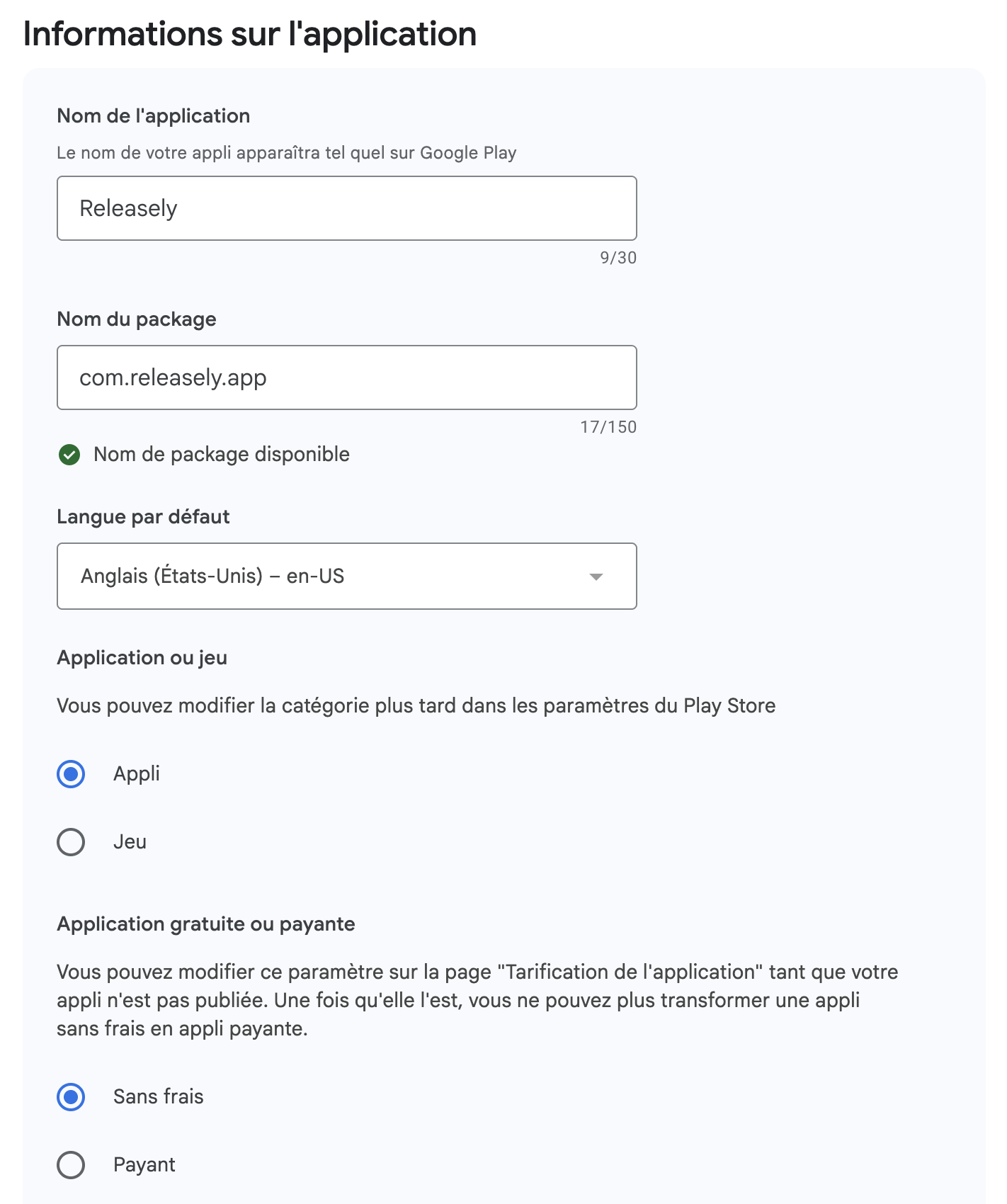
Note your package name: you'll reuse it in Releasely.
Scratchpad: Package name
Available any time via the
What's next?
Your app exists in the Play Console. Next, create the API access (service account) that lets Releasely publish on your behalf.