Join the Apple Developer Program
Apple's paid developer membership, required to publish your app on the App Store.
Your Apple Account is ready. To actually publish on the App Store, you now need an Apple Developer Program membership. It's Apple's official subscription for app creators: it costs $99 per year and gives access to App Store Connect, where your app is managed.
Already a member?
Don't buy it again. Jump straight to Verify your membership.
Individual or organization?
When you enroll, Apple asks you to choose a membership type:
- Individual (recommended to start): the simplest and fastest path. Your legal name will appear as the seller of the app on the App Store.
- Organization: choose this if you publish on behalf of a company. It requires a D-U-N-S number (a free business identifier that can take several days to obtain) and proof that you can legally bind the company.
If you're unsure, start as an Individual.
Enroll
What to prepare
This step involves a $99 payment and an identity verification with an official document (driver's license or passport). Have them ready before you start.
Open enrollment
On your iPhone, install and open the Apple Developer app: it's the simplest path, since identity verification happens right there. You can also use developer.apple.com/programs/enroll.
Sign in and choose "Individual"
Sign in with your Apple Account (the one you secured in the previous step), start enrollment, and choose Individual.
Enter your legal information
Provide your exact first and last name, your address, phone, and email. Use your real legal information: a pseudonym, nickname, or company name in place of your name delays approval, and a P.O. box is not accepted as an address.
Verify your identity
The app guides you to scan an official ID (driver's license or passport) to confirm your identity.
Accept the agreement and pay
Accept the Apple Developer Program License Agreement, then pay the $99 annual membership.
Apple then reviews your application. Approval is sometimes immediate, sometimes longer (from a day to a few days).
Verify your membership
This is the reassuring part: the information lives in a specific section of your developer account.
Open the membership details
Sign in at developer.apple.com/account, then open Membership details from the menu at the top of the page.
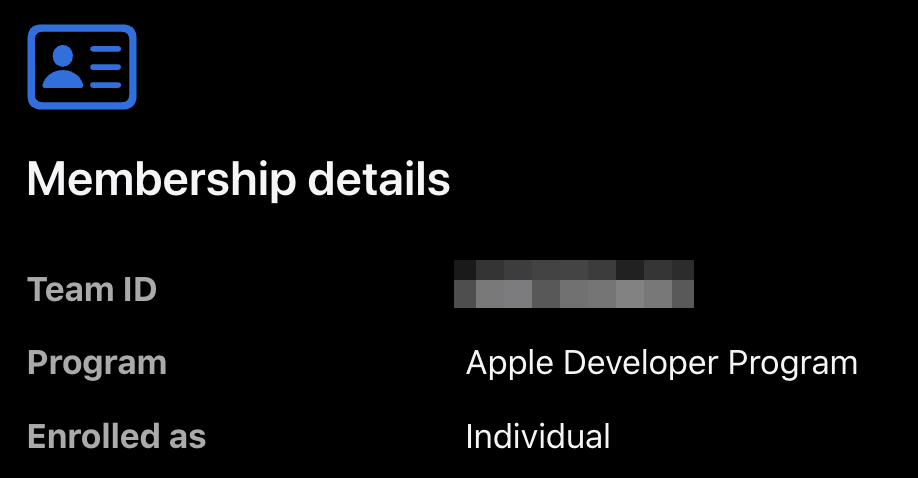
Read the membership information
You'll find your Team ID (a 10-character identifier), the Program listed as Apple Developer Program, and Enrolled as: Individual. The presence of this information confirms that your membership is in place.
Another way to check
Open appstoreconnect.apple.com. If you can reach the Apps section, your developer access is active — that's where the next steps will take place.
What's next?
Your membership is active. You can now create the access key that lets Releasely publish your apps for you.