Version submission
The information Apple asks for when you create a version and submit — review information and encryption declaration.
When you create a version in Releasely (the Versions step) and upload your build, Apple asks for a few pieces of information tied to that specific version — not to the whole listing. Releasely handles creating the version and uploading the build; the settings below are filled in App Store Connect.
App Review Information
This information is used for Apple's review (it isn't public):
- a contact (name, email, phone);
- a demo account (username + password) if your app requires sign-in — without it, review is rejected;
- free-form notes to tell the reviewer how to use the app if needed.
Export Compliance / encryption
After you upload a build, it shows up with a "Missing Compliance" status. Click Manage to fill in the encryption declaration.

Apple then asks what type of encryption your app implements.
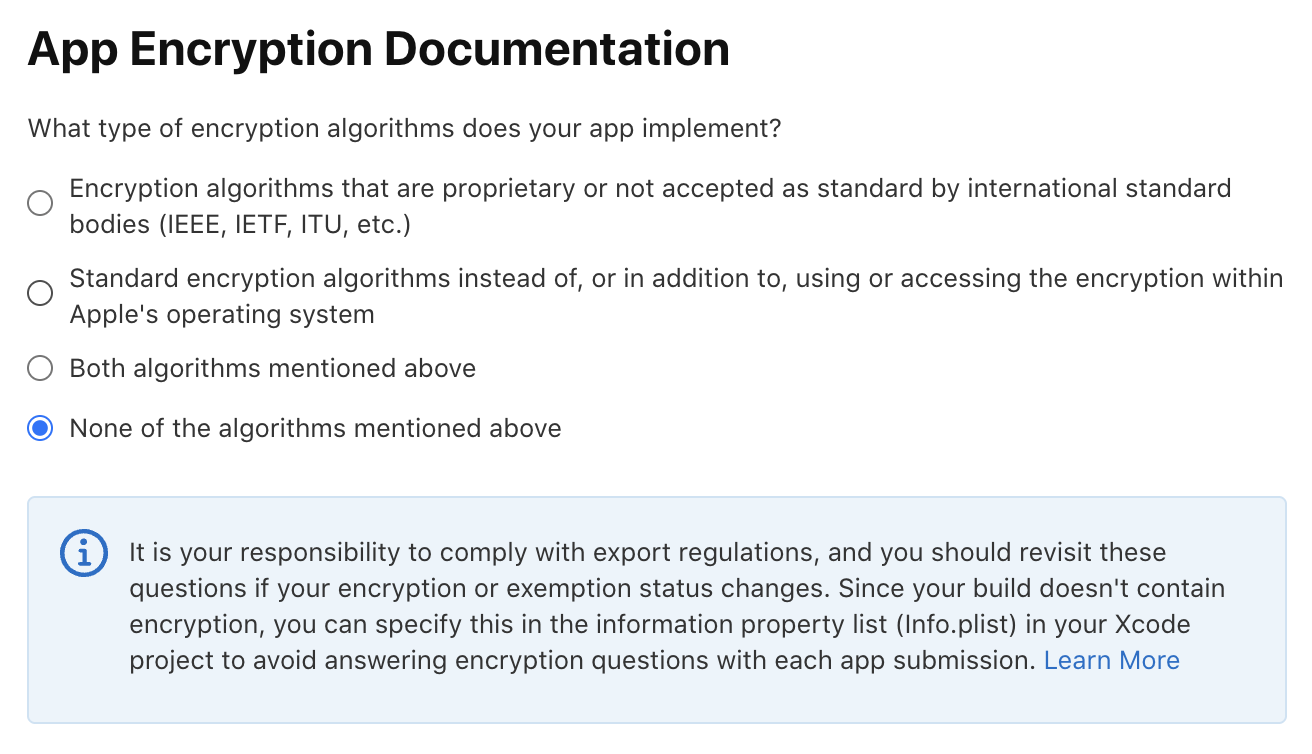
In the vast majority of cases, choose "None of the algorithms mentioned above". Most apps only use the standard encryption provided by iOS (HTTPS connections), which is exempt: they don't implement any of the listed types themselves. The declaration ends there, with no extra document.
The other answers only apply to apps that implement their own encryption:
- Standard encryption algorithms… — your app uses a standard encryption algorithm in addition to the system's (for example to encrypt data locally). Often still exempt, but may require an annual self-classification report.
- Proprietary or non-standard… — your app implements custom or non-standard encryption. This case requires export compliance documentation (a heavier process).
- Both… — a combination of the two.
This question comes back on every new build
Apple calls it "App Encryption Documentation" and asks it on every uploaded build. To stop
answering it manually, your app can pre-declare it once in its configuration (the
ITSAppUsesNonExemptEncryption option).
Translating your subscriptions (App Store)
Localize the name and description of your subscriptions and subscription groups in App Store Connect, with character limits, fallback behavior and Apple's review rules.
Publish to the Google Play Store
Overview of the Android journey — the steps to follow, in order, to bring your app to the Google Play Store.